mote is now mori — only the name changed
Since 15 September 2026 this app is called mori. The company and the address stay motemd; your documents, your settings and your licence key stay where they are. What changed is where the name shows.
This app started life as mote. Since 15 September 2026 its name is mori. If you typed mote into a search box, you are in the right place — same app, same people, same address.
There is one reason for the change. The Microsoft Store already had an app called mote, and a product with the same name sits in the same category. We found out while preparing the Windows app, which is next in line, and mori is the name left standing after checking the candidates against the stores, the domains and the package repositories one by one. In Japanese it reads as 森 — a forest, the quiet of something that does nothing while it sits open — and as 守り — keeping, as in not changing a byte you did not write. On screen it is always lowercase mori.
What changed, and what did not
What changed is every place the name shows: the window title and the twelve languages of the interface, mori --version, the binary, the app id com.motemd.Mori, the desktop entry and icons, the apt package mori, the Flatpak com.motemd.Mori, the file names of the downloads, the site, the docs, this blog, and the public repository motemd/mori.
More stayed than changed. The company and the address are still motemd and motemd.com. Nothing happens to your documents — the app writes only the bytes you typed, and a new name is no reason to touch a file. Your settings come along. The first launch under the new name renames ~/.local/state/mote once, and settings, sessions, drafts, backups, the trial record and an activation are all still inside. Your licence key stays valid too — a new name is no reason to get a new key.
Things written under the old name do not break either. Earlier releases keep their file names and checksums as they were — those bytes went out under that name, and that signature points at them — and the signing-key address get.motemd.com/mote.asc stays open. The site tells search engines that mote is mori's former name. So whether you followed an old link or searched the old name, this is the app.
If you already have it installed
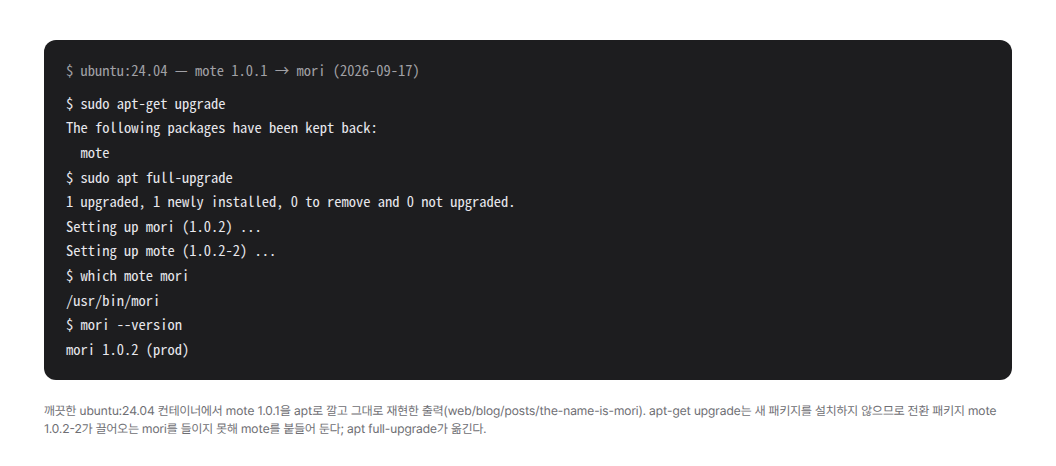
If you installed with apt, a transitional package does the moving. The repository carries an empty mote 1.0.2-2 that pulls in mori, so one sudo apt full-upgrade — or sudo apt install mori — is all it takes. One thing worth knowing in advance: apt-get upgrade never installs a package that was not there before, so it keeps mote back and moves on. The picture above is that exact sequence in a clean Ubuntu 24.04 — at the end /usr/bin/mote is gone and /usr/bin/mori is there.
Flatpak carries a signpost from the old app id to the new one, so flatpak update moves it. If you installed into your home with install.sh, run the same command again; the script removes the old ~/.local/opt/mote and its desktop entry. The AppImage and the tarball do not move on their own: the version number is still 1.0.2, so the update check sees nothing newer. Download the file again and it has the new name.
The version is still 1.0.2
1.0.2 first went out on 14 September under the name mote. We re-issued those bytes under the same number, and the name is the only difference — not a line of the editor's behaviour changed. That is why the version did not move, and why only apt's transitional package carries a revision, 1.0.2-2, to step over the same version already installed. The tag v1.0.2 still points at the 14 September cut; only the re-issued bytes went up under the new name.
The name changed. The promise — only the bytes you wrote are saved — did not.